Hi again neighbors -
In a previous article I briefly talked about apps I use as an entrepreneur but didn't really go into that much detail about the hardware. One significant tool that unquestionably increases my productivity is my Verizon Motorola Droid X2.
I joke that my smart phone is my BFF but I told myself when I was thinking about purchasing a smart phone that I would only make the investment if it increased my productivity by 10%. I made the leap a couple years ago and totally worth it! My IT friend loves everything Google and I've been drinking the Kool-Aid ever since. Sure I miss out on some apps like Instagram for the iPhone but my phone syncs with all the Google applications I already use without skipping a beat: Gmail, Calendar, Documents, Picasa, and Reader, all while helping me with a load of other functions that keep me moving forward. Check out the list below for just a few reasons why I think my smart phone rocks!
- I can tweet and Twitpic while roaming around the IE.
- I jot down my brainstorming ideas with Evernote. Evernote is an app on your phone and all notes are uploaded to the web where I can access at a later time.
- Also, this may sound nerdy, but I also use the Google record app to record random ideas. I then review the saved recording to determine my next action items.
- I can also access Basecamp Mobile, the project management software that syncs with my online account.
- The Hootsuite app lets me make on the fly updates to any scheduled posts.
- Google's Blogger app allows me to start drafting my blog posts so that I can finish them up later.
- Audible.com mobile app allows me to add business books to my library so that I can listen to books while on the go. Very useful especially when you don't have a lot of time to read.
Do you have a gadget you can't live without? Share it with us on FB or tweet us.

I am building an online destination for Inland Empire, CA. This blog shares my experience of exploring and discovering IE attractions while building a website and business. Website launching this summer: www.IEShineOn.com
Showing posts with label tools. Show all posts
Showing posts with label tools. Show all posts
Monday, October 10, 2011


Tuesday, October 19, 2010
TinEye Reverse Image Search
TinEye Reverse Image Search
I saw this website recommendation on How About Orange. TinEye is a reverse image search. It's a brilliant resource for designers, photographers, artists or anyone who is concerned that the images they upload to the web are being used without their permission. Also, great way to ensure your company's logo isn't being used somewhere without your knowledge.
The home page has a really simple interface - two options: upload image and search or enter the image address url. It's definitely a tool I'll keep in mind when I have to do an evaluation of my brand online.

I saw this website recommendation on How About Orange. TinEye is a reverse image search. It's a brilliant resource for designers, photographers, artists or anyone who is concerned that the images they upload to the web are being used without their permission. Also, great way to ensure your company's logo isn't being used somewhere without your knowledge.
The home page has a really simple interface - two options: upload image and search or enter the image address url. It's definitely a tool I'll keep in mind when I have to do an evaluation of my brand online.

Monday, August 9, 2010
Google Apps for Your Business: The Good, the Bad and the Ugly - Entrepreneur.com
As an entrepreneur, I need to squeeze in work time whenever I can. And unfortunately for the company I work for, that includes my 9-5 office hour time. Tools like Google Docs, Google Voice and Basecamp allow me to work from the 9-5 office and from my phone. The following article gives an interesting recap of the different Google resources. I disagree with them about Google Voice being on their "Not so great" list. Using Google Voice allows me to reduce my cell phone bill - and we all know that every dollar always counts ;-).
Google Apps for Your Business: The Good, the Bad and the Ugly - Entrepreneur.com
Google Apps for Your Business: The Good, the Bad and the Ugly - Entrepreneur.com
Wednesday, May 19, 2010
Evernote Review
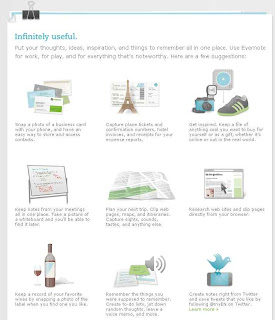
My first review on productivity tools is Evernote. The image below is a description on their site about how to use Evernote. I especially enjoyed their soft edged graphics. But before I go into my review about Evernote, let me tell you how I discovered it. I stumbled upon an article titled, "12 Essential Android Apps for SMBs." http://tiny.cc/acl98 They listed the usual, Google Maps, Skype Mobile, Google Goggles which other blogs have been praising as well. I have some of these apps already but I discovered a few new ones I thought might be interesting to use and review like Evernote, Documents to Go, PageOne Personal Assistant and Pocket Lie Detector (that should be fun!).
So, couple weeks ago I attended an SBA/SCORE class in Glendale about building business credit and reviewed twenty recommended steps on how to accomplish it. Lots of great tactics and taught by an entrepreneur and business development consultatnt - super helpful! So, I thought I'd test my Evernote tool and record the session using the audio text tool. On my way home, I listened to the recorded sessions which I split into five parts. I found it useful because often times I can't write fast enough to get all the notes and for something as important as this I definitely didn't want to miss any details.
Next time, i may try recording it on Google Voice so the recording can then be transcribed, which I feel Evernote is missing. Also, would be nice if Evernote's text and audio notes could be transferred more easily to blogs.
Next productivity tool review will be Basecamp. It's an online project management tool I've been using for five years now and I can't imagine building my site without it. Stay tuned...

So, couple weeks ago I attended an SBA/SCORE class in Glendale about building business credit and reviewed twenty recommended steps on how to accomplish it. Lots of great tactics and taught by an entrepreneur and business development consultatnt - super helpful! So, I thought I'd test my Evernote tool and record the session using the audio text tool. On my way home, I listened to the recorded sessions which I split into five parts. I found it useful because often times I can't write fast enough to get all the notes and for something as important as this I definitely didn't want to miss any details.
Next time, i may try recording it on Google Voice so the recording can then be transcribed, which I feel Evernote is missing. Also, would be nice if Evernote's text and audio notes could be transferred more easily to blogs.
Next productivity tool review will be Basecamp. It's an online project management tool I've been using for five years now and I can't imagine building my site without it. Stay tuned...
Subscribe to:
Posts (Atom)
AddThis

